Shopify speed. WooCommerce freedom.

Speed up your WooCommerce admin. Keep everything else.

The fast admin workspace for WooCommerce products, orders, subscriptions and coupons.

Shopify-speed store management on the WooCommerce store you already own: up to 20× faster than the classic admin, nothing to migrate, nothing rented, no revenue share.

Weighing Shopify against WooCommerce? Read the Shopify vs WooCommerce comparison

Typical search
100–200 ms
Catalogue scale
30k – 1M records
Your data
Stays on your server
0:00 / 1:27
Search as you type, quick edit, categories managed in place, the product editor and variations, bulk update, the order desk, profit analytics and inventory. Jump to any part with the chapters. Recorded on two test stores with 900 and 3,500 products. Real timings, no speed-up.

01Before / after

The old way,
and the fast way.

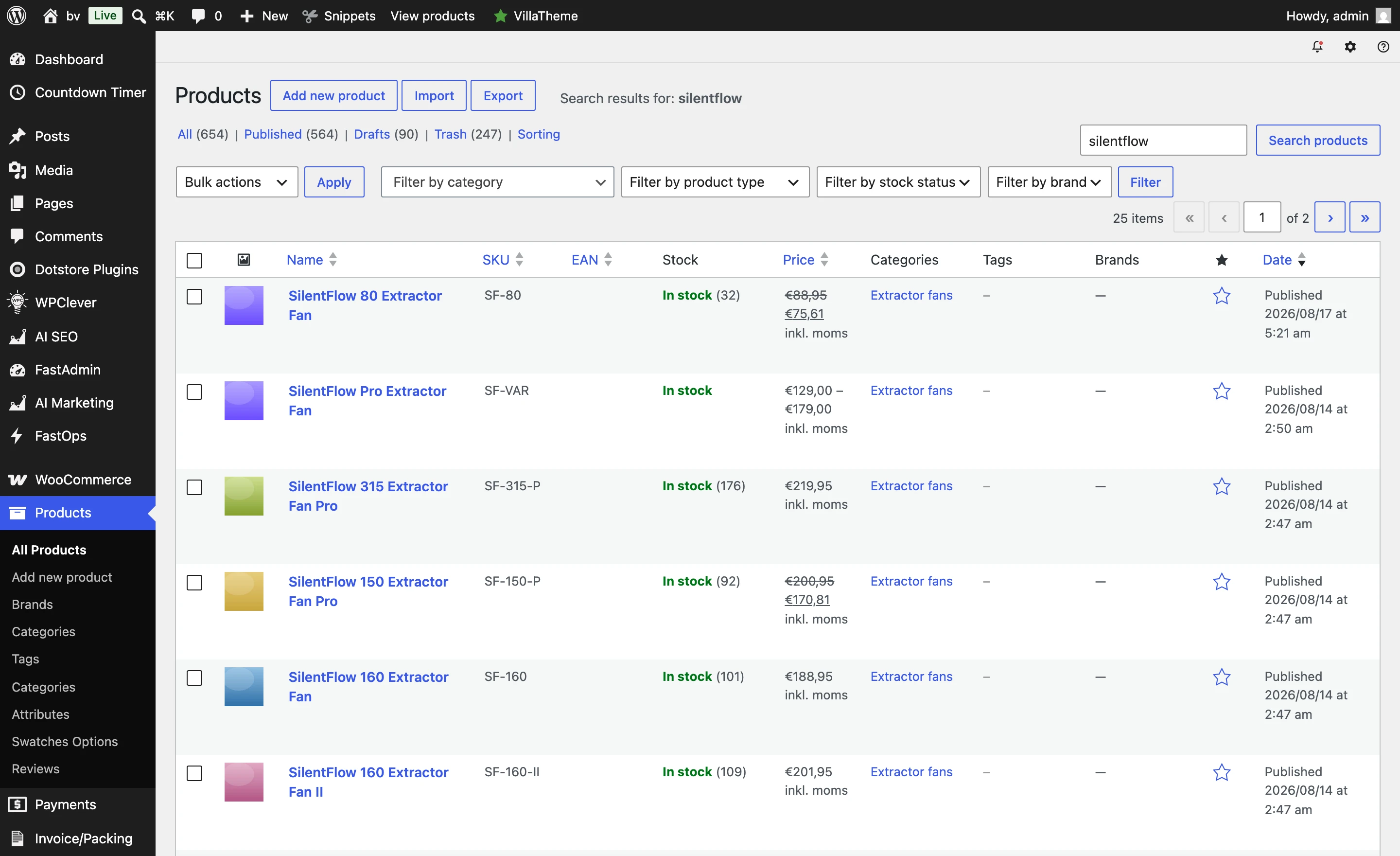
The same store, the same data, the same plugins. Only the workspace changes. Drag to compare.

The classic WooCommerce products screen in wp-admin: a paged list with the WordPress sidebar and filter bar. The same catalogue in FastOps: a typed search already filtered to matching products, with SKU, status, stock, type and price in one list.
Every click a page reload. Search crawls on a large catalogue. Results as you type. Open, edit and save in a second or less.

Classic wp-admin and FastOps,
side by side.

Nine things a store team does every day, on the same WooCommerce store. Nothing is migrated, nothing is replaced.

Every day
Classic wp-adminThe admin you have
FastOps for WooCommerceThe same admin, without the waiting≤ 1 s per action
Finding a productNames, SKUs, GTINs
Type, press Enter, wait for a full page load. Several seconds per search on a large catalogue.
Results appear as you type, across the whole catalogue, in a second or less.
Open, edit, saveProducts, orders, coupons
Open, save, back: three full page loads, each several seconds on a large store.
Open, edit and save in a second or less, and you are already back in the list.
VariationsPrice, stock, SKU per variant
One accordion at a time, and every save reloads the page.
All variations in one matrix. Edit row by row or all at once, saved in a second.
Bulk changesPrices, sale dates, stock, categories
Only the current page of results, in one long request that can time out halfway with no record of what failed.
Any filter, as a background job with live progress, cancel and an error ledger per record.
Working ordersStatus, addresses, items, notes
List, search, open and status change each reload the page. A busy desk waits hundreds of times a day.
Find as you type, change status and details in one view, profit per order. No reloads.
Who changed whatOn every record
Order notes only. Nothing on products, coupons or subscriptions.
An activity log on products, orders, subscriptions and coupons, who and when.
Extension fieldsWPML, ACF, cost of goods, Smart Coupons
Scattered meta boxes on a page that gets slower with every extension you add.
In the editor, through certified adapters, written back through the extension.
ProfitPer product and per order
Cost per item, if the optional core setting is on. No profit figure, nothing in Analytics.
Cost, computed profit and margin beside every price and on every order, from your cost-of-goods source.
What stays the sameTheme, checkout, plugins, data
Everything.
Everything. WooCommerce stays the source of truth.
Speed refers to day-to-day admin tasks on a correctly configured store. Bulk jobs take as long as the records and your plugins require.

02Why FastOps

Fast by design.
Safe by default.

The responsiveness store teams expect from Shopify, inside WooCommerce, with WooCommerce still in charge of every change.

  1. 01
    Fast by design

    A workspace built for the daily work.

    Engineered to answer within a second, whatever the catalogue size.

  2. 02
    WooCommerce stays in charge

    Every change goes through WooCommerce.

    Version-checked, recorded, then written the way wp-admin would write it. Hooks fire.

  3. 03
    Extensions understood

    Your extensions, first-class.

    Certified adapters expose extension fields with their own rules and validation.

  4. 04
    Nothing leaves your server

    Your store, your database, your rules.

    No migration, no external service in the path of daily work, no revenue share.

The FastOps product editor: regular and sale price with a sale schedule, a Cost of Goods section with cost, handling fee and computed profit, and an inventory section with SKU and GTIN.
  • Version-checkedevery save
  • Recordedbefore applied
  • Through WooCommercehooks fire
  • On your servernothing leaves

03The workspace

One desk for
the whole day.

Products, orders, subscriptions, coupons, analytics, marketing and inventory. One interface, one set of habits.

A / Products

Everything about a product, on one screen.

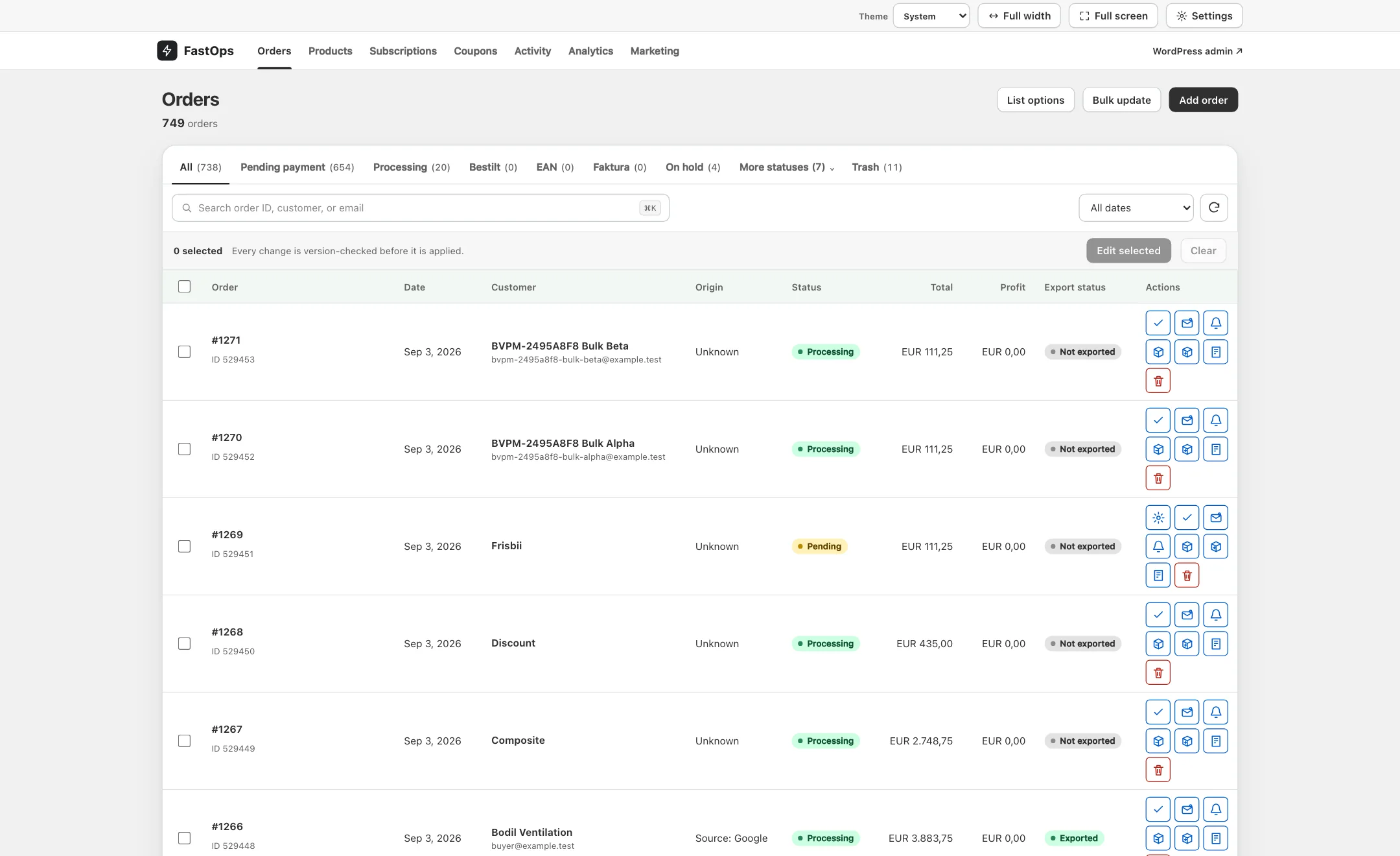
Pricing, stock, identifiers, categories, attributes, media and extension fields, grouped where a merchandiser expects them.

  • Bulk edit
  • Variation matrix
  • WPML translations
  • Type-ahead search
All about Products
The FastOps product editor: regular and sale price with a sale schedule, a Cost of Goods section with cost, handling fee and computed profit, and an inventory section with SKU and GTIN.

Product editor · Cost of Goods fields rendered natively, beside SKU and GTIN

B / Orders

Order work that keeps WooCommerce behaviour.

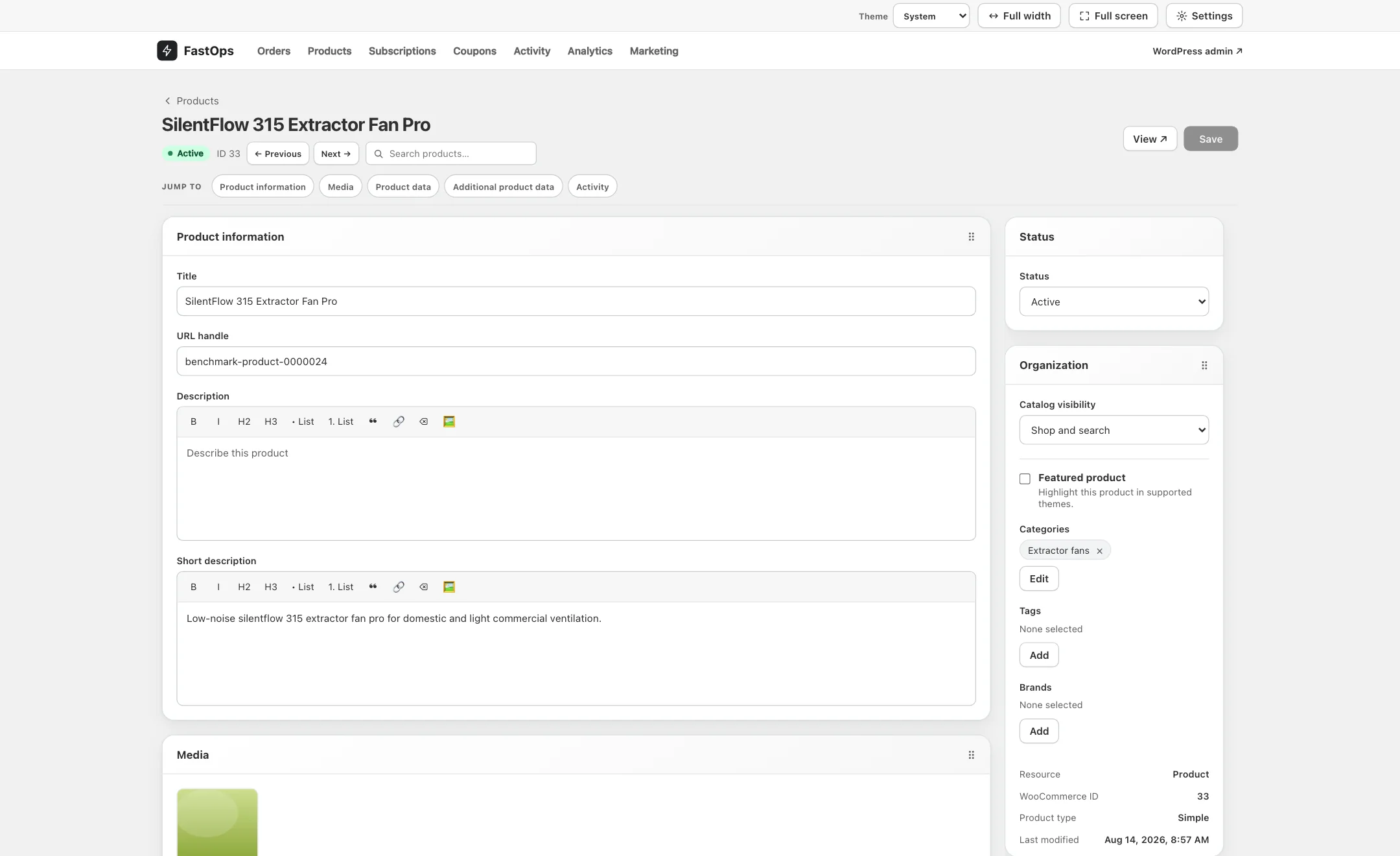
Find by number, customer or email as you type. Change status, addresses and line items, with profit per order when a cost source is installed.

  • HPOS
  • Status transitions
  • Readable notes
  • Cost & profit
All about Orders
The FastOps orders list: orders with order number, date, customer, status, total and a profit column supplied by the Cost of Goods extension.

Orders list · the profit column comes from the store's Cost of Goods extension

C / Subscriptions

Recurring revenue, without the recurring wait.

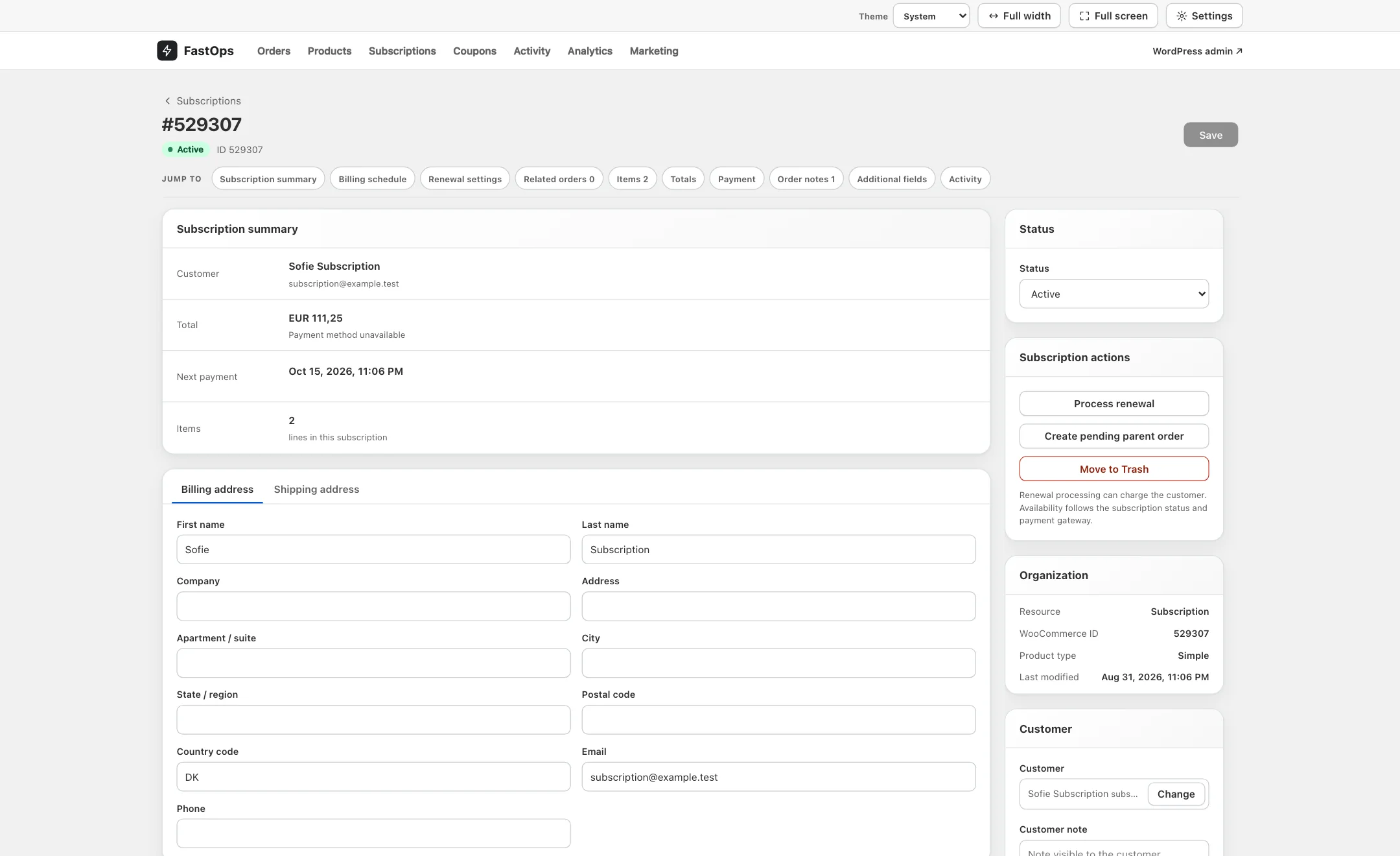
Schedules, renewal modes, statuses and related orders, edited from the same fast surface as products.

  • Schedules
  • Status changes
  • Related orders
  • Hidden when unused
All about Subscriptions
The FastOps subscription editor: billing interval and period, start, trial end, next payment and end dates, renewal settings, the related parent order and the subscription line item.

Subscription editor · schedule, renewal mode, related orders and line items

D / Coupons

Campaign rules you can actually read.

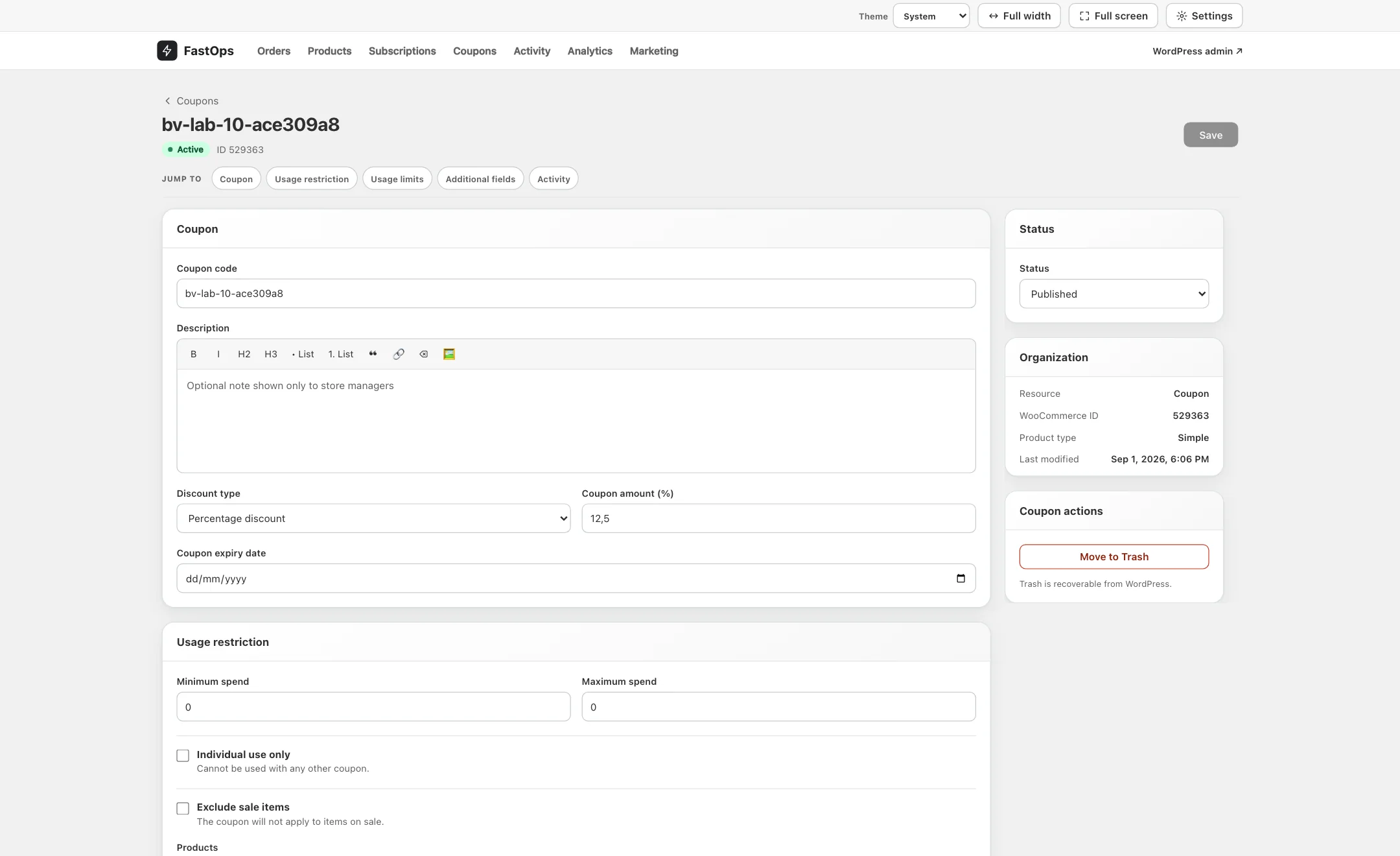
Discount, amount, expiry, limits and restrictions laid out plainly, with certified Smart Coupons fields.

  • Fixed & percentage
  • Usage limits
  • Product restrictions
  • Bulk creation
All about Coupons
The FastOps coupon editor for AUTUMN25: coupon code, description, percentage discount type, amount and expiry date, with usage restriction fields below.

Coupon editor · discount type, amount, expiry and usage restriction

E / Analytics Pro

Revenue, orders and profit, from the same fast surface.

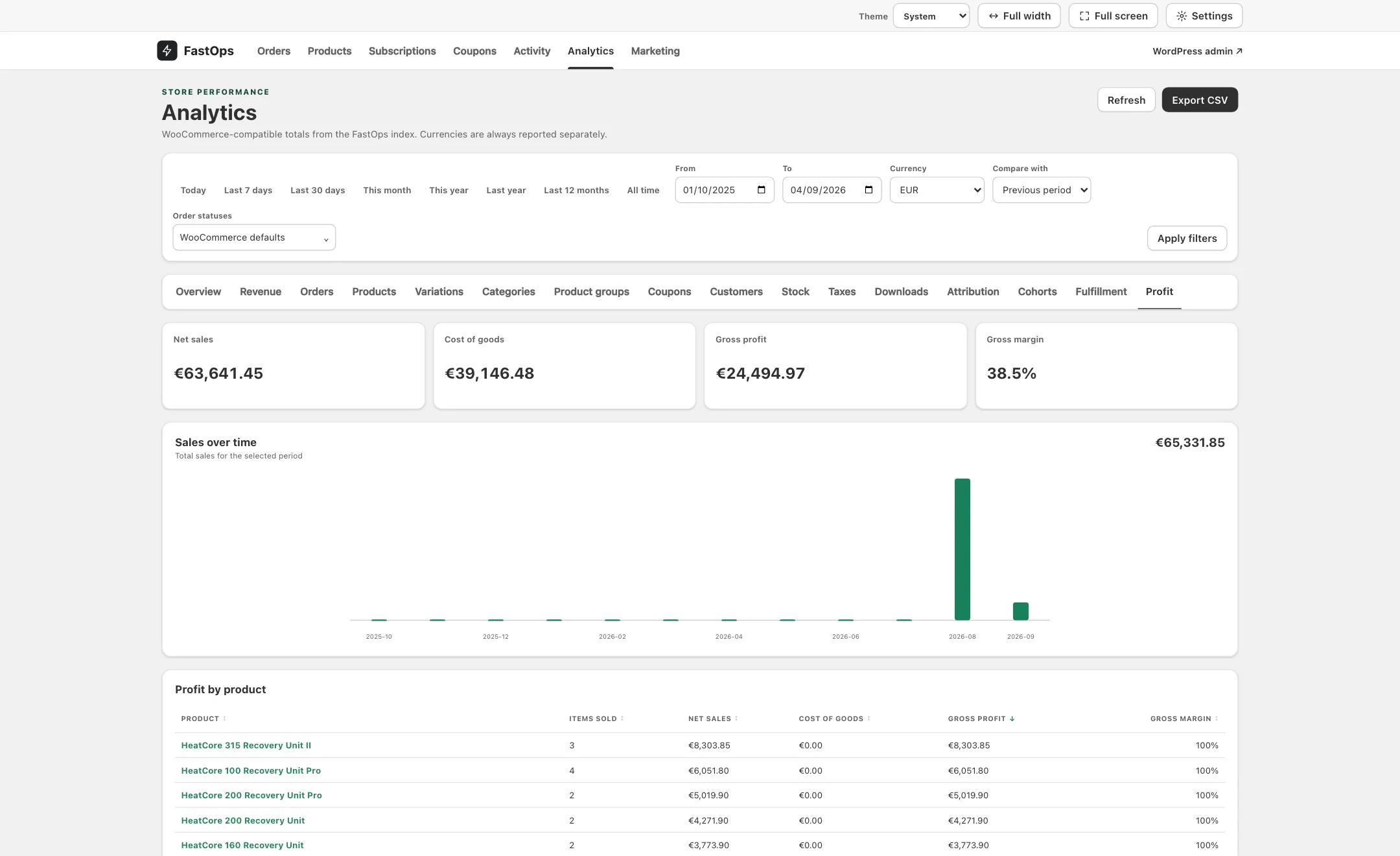
Sales, orders and gross profit over any period, compared with the period before. Currency and WPML language as dimensions, product and variation profitability, CSV export. Read from your own WooCommerce data, so a report never adds load to the store your customers are shopping in.

  • Comparison periods
  • Currency & language
  • Product profitability
  • CSV export
All about Analytics
The FastOps Analytics profit report: net sales, cost of goods, gross profit and gross margin for the last twelve months, with profit by product.

Analytics · net sales, cost of goods, gross profit and margin, with profit by product

F / Marketing analytics Pro

Ad spend and real profit, in one table.

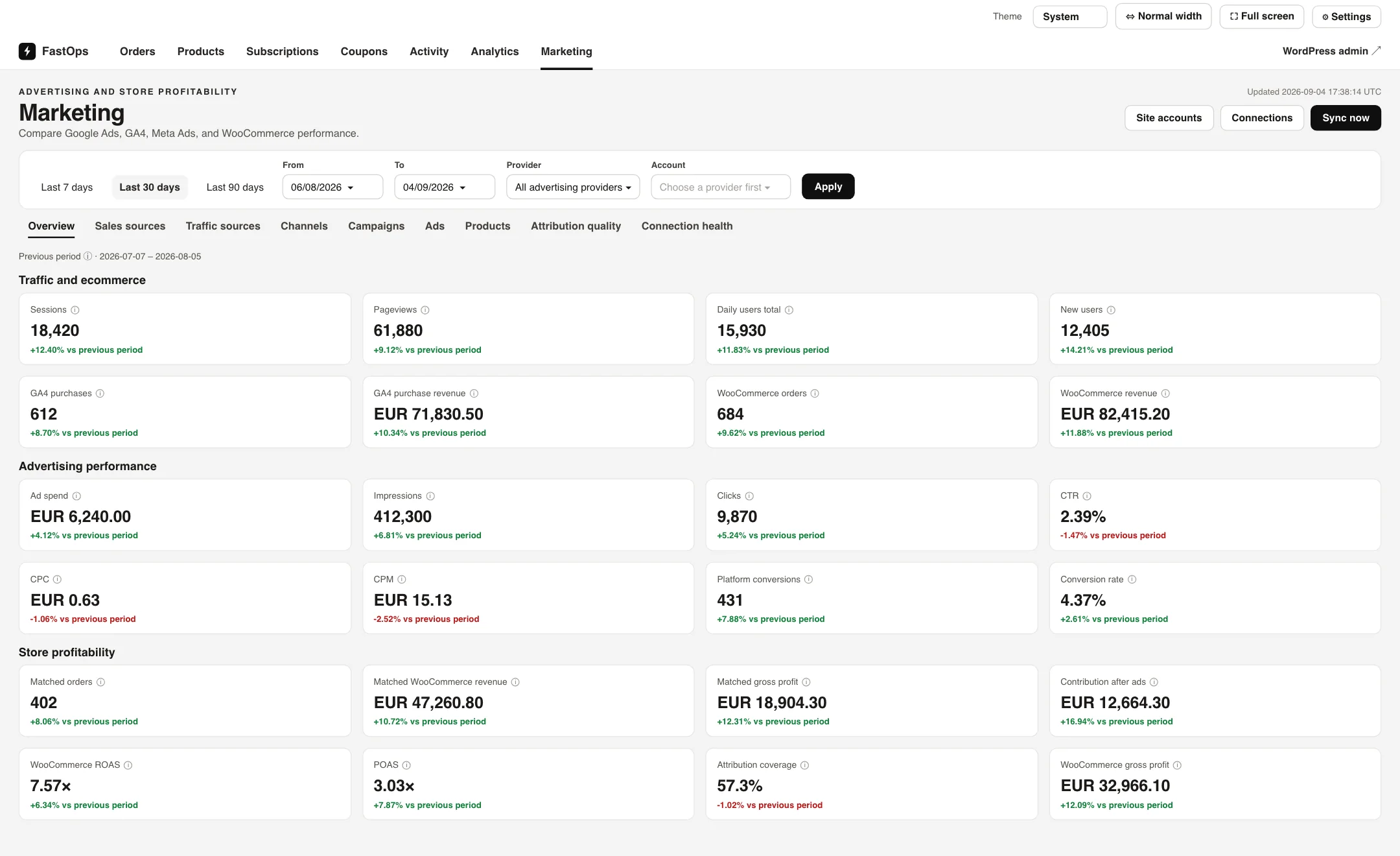
Connect Google Ads, GA4 and Meta. FastOps matches campaigns to the WooCommerce orders they produced and shows spend, clicks, conversions, revenue and profit side by side, so you see profit on ad spend, not just the platform's own ROAS. Overview, sales sources, traffic sources, channels, campaigns and ads, with CSV export.

  • Google Ads
  • GA4
  • Meta
  • Profit on ad spend
All about Marketing analytics
The FastOps Marketing overview on a connected store: GA4 sessions and purchases, WooCommerce orders and revenue, ad spend, CTR, CPC and platform ROAS, and store profitability with matched gross profit, POAS and contribution after ads, each against the previous period.

Marketing · traffic, advertising and store profitability on one screen, each against the previous period (representative figures)

G / Inventory New

Stock, suppliers and warehouses, beside your products.

Current, reserved and incoming stock with every movement recorded. Suppliers, purchase orders and receiving. Warehouses, bins, picking, packing, shipping labels and returns. WooCommerce stays the source of truth.
  • Purchase orders
  • Multi-warehouse
  • Shipping labels
  • Returns
All about Inventory
  • Every movement recordedadjustments, receipts, transfers, counts and picks, with who and why
  • Suppliers and purchase ordersterms, lead times, landed costs and approvals
  • Pick, pack, ship, returnwaves, scan-verified packing, labels through seven platforms
  • Included with Growthand every plan above it

04What it covers

Every admin job
that used to make you wait.

One fast surface for the whole back office.

05Performance

Fast on every record.
Not just the first one.

Search, open, edit, save: a second or less, at thirty thousand records or a million. That is the Shopify benchmark, met on WooCommerce.

200ms Typical search or individual action
≤ 1s Design target for any everyday operation
1M Records on a single store
0 Products, orders or customers sent to us

Change one price on a large store. Press run and watch both routes.

The usual path 0.00s
  1. Open wp-admin
  2. Boot WordPress, theme and 0 active plugins
  3. Render the products screen
  4. Search and page to the record
  5. Open the product editor — boot everything again
  6. Save, reload, verify
Waiting…
The FastOps path 0.00s
  1. Find the record as you type
  2. Change it and save, version-checked, through WooCommerce
Ready

Representative of a large store with a heavy plugin stack, not a benchmark. Bulk jobs run in the background and take as long as the records require.

01

Your commerce data never leaves the store.

Products, orders, customers and payments stay in your WordPress database. The cloud only handles licensing, health and signed updates, and the workspace keeps working without it.

02

Shared hosting

Runs on ordinary shared hosting with a single cron entry.

03

VPS & dedicated

Better hardware simply makes a fast tool faster.

04

WPML & WCML

Language-aware lists and translation switching.

05

Multisite, per site

Each subsite set up and licensed on its own.

06

Speed never overrides integrity.

Every edit version-checked and recorded before it is applied. Nothing silently overwritten.

06Integrations

Your extensions,
first-class.

87 certified adapters make extension fields editable with the same guarantees as core fields. Anything unknown stays read-only, never rewritten.

07Pricing

Pay for fewer
waiting hours.

A flat plan per store. No Shopify-style revenue share, no per-seat pricing, staging included.

01 / Plan

Starter

The fast workspace for a growing store: products, orders, subscriptions and coupons, with every certified adapter.

$49/ month

or $490 a year, two months free

  • For stores with up to 10,000
  • Products + orders + subscriptions
  • Bulk jobs with progress and error ledger
  • All certified integrations
  • Production store and staging site
  • Signed updates and email support
Talk to us
03 / Plan

Scale

For large catalogues and busy order desks: everything in Growth plus priority support and early access to releases.

$199/ month

or $1,990 a year, two months free

  • Up to 250,000 records
  • Everything in Growth
  • Priority support from the people who build it
  • Early access to new releases
  • Production store and staging site
Talk to us
04 / Plan

Enterprise

From 250,000 records to a million and beyond, several stores, or an agency portfolio: scoped with you and quoted in one call.

Let’s talk
  • 250,000 to 1,000,000+ records
  • Everything in Scale
  • Onboarding call and a named contact
  • Invoice billing
  • Agency bundles from five stores
Let's talk

Plus applicable sales tax. Every plan covers one production store and its staging site; records are products, orders and subscriptions added together.

08Questions

Asked before buying.
Answered in the first sentence.

How does FastOps make the WooCommerce admin faster?

FastOps gives your team a dedicated workspace for products, orders, subscriptions and coupons that is engineered to answer within a second, instead of rebuilding a classic admin page on every click. The engineering behind that is ours; the result is that search, open, edit and save take a second or less on a correctly configured store, while WooCommerce stays the source of truth.
Does FastOps replace WooCommerce?

No. WooCommerce stays your store and your source of truth. FastOps is an admin workspace layered on top of it: your theme, checkout, payment gateways, shipping and every other plugin keep running exactly as they do today, and shoppers never see FastOps.

Is it safe to edit a live store through FastOps?

Yes. Every edit is version-checked against the record as it was when you opened it, recorded before it is applied, and written through WooCommerce's own data layer, so hooks, validation and other plugins see the change exactly as if it had been made in wp-admin. Nothing is ever silently overwritten.

Will my other WooCommerce plugins keep working?

Yes. FastOps reads and writes through WooCommerce, so plugin hooks fire as normal. Fields owned by supported extensions, such as WPML, Advanced Custom Fields, Cost of Goods, Smart Coupons and Sequential Order Numbers, appear in the editor through certified adapters. Fields it does not recognise are shown read-only and never rewritten.

Does FastOps support HPOS and WooCommerce Subscriptions?

Both. High-performance order storage is supported natively, and when WooCommerce Subscriptions is installed the workspace adds subscription search, schedules, status changes and related orders. Stores without subscriptions simply do not see that navigation.

What hosting does FastOps need?

Ordinary WordPress hosting: PHP 7.4 or newer, WordPress 6.6 or newer and WooCommerce 8.2 or newer, on MySQL or MariaDB. It runs on shared hosting with a single cron entry; a VPS or dedicated server simply makes a fast tool faster. No external service sits in the path of daily store operations.

More questions

How are the speed claims measured?

"Up to 20× faster than the classic WooCommerce admin" compares the time to search, open and save a record in wp-admin on a large store with a typical plugin stack against the same actions in FastOps, where an individual operation is designed to complete in a second or less. "3–4× faster than Shopify" refers to day-to-day management tasks measured the same way. Bulk jobs run in the background and take as long as the records and your plugins require.

Where does my store data go?

Nowhere. Products, orders, customers and payment data stay in your WordPress database on your server. FastOps Cloud only handles licensing, update delivery and health metadata such as versions and record counts, and the workspace keeps working if Cloud is unreachable.

Can I bulk edit products and orders?

Yes. Bulk jobs take a snapshot of the selected, filtered or entire scope, run in the background with live progress, can be cancelled, and keep an error ledger per record so a single failure never hides in a thousand successes.

Does it work with WPML and multilingual stores?

Yes. With WPML and WooCommerce Multilingual installed, FastOps is language-aware: product lists and pickers respect the current language, and you can switch between a product's translations from the editor.

Is FastOps a Shopify alternative for WooCommerce stores?

Yes, for the reason most WooCommerce stores look at Shopify: admin speed. FastOps gives day-to-day management on WooCommerce the responsiveness of Shopify, up to 3–4× faster on the same tasks, without migrating the store, rebuilding the theme and checkout, replacing plugins with apps, or paying a share of revenue. If you are comparing Shopify vs WooCommerce because the admin is slow, FastOps is the plugin that removes the reason to move.

What does FastOps cost?

A flat plan per store, sized on the records the store holds, with no percentage of your revenue and no per-seat pricing. Every plan covers the production store and its staging site, updates, and support from the people who build it.

How do updates work?

Releases are delivered by FastOps Cloud as signed packages that the plugin verifies before installing, and you can opt a site into staged automatic updates. Each attempt reports back, and WordPress rolls back an update that fails its post-install check, so a bad release never strands a store.

10Questions

Not sure it fits your store?

Tell us about your catalogue, hosting and the extensions you run, and whether Shopify is on the table. A real person answers, usually the same day.