⚡Performance
How to speed up a slow WooCommerce admin
A slow WooCommerce admin is almost always the product list, the order list and the editors taking seconds per click once the catalogue and the plugin stack have grown. This page covers what helps, what does not, and how a WooCommerce admin plugin like FastOps makes everyday actions take a second or less without changing your storefront or your host.
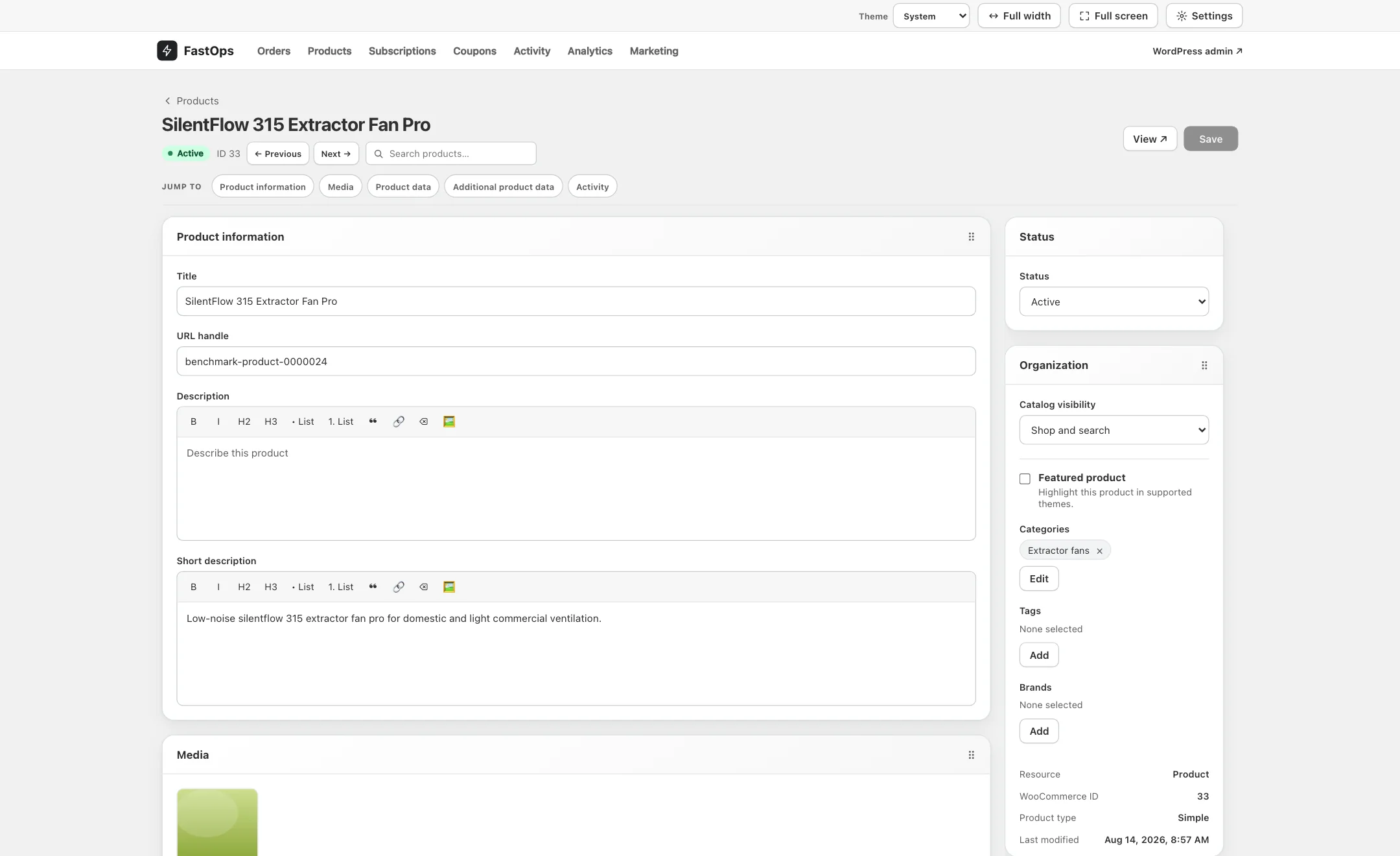
The product editor. Open, edit and save take a second or less on a correctly configured store, from thirty thousand records to a million.
Why the WooCommerce admin slows down as a store grows
The classic admin rebuilds a full page on every click. Opening the product list, filtering it, opening a product, saving it and going back are five separate page builds, and each one grows with the size of the catalogue and the number of extensions installed. On a small store that is a fraction of a second and nobody notices. On a catalogue of thirty thousand products with a typical stack of extensions it becomes several seconds per click, and an order desk or merchandising team feels every one of them.
It is worth being precise about what is slow. Shoppers usually see a fast storefront because of caching and a CDN. The admin cannot be cached in the same way, because every screen is personal to the person using it and must reflect the store as it is right now. That is why a store can be quick for customers and painful for staff at the same time.
Fixes that help, a little
- Hosting and PHP. A current PHP version and a host with enough memory and CPU make every page build faster. This is the first thing to check, and it is rarely enough on its own.
- A persistent object cache. Redis or Memcached, where your host offers it, spares repeated database lookups within a request.
- Fewer plugins. Every active plugin adds to every admin page build. Removing the ones you no longer use helps, but the ones you depend on are the ones that cost the most.
- High-performance order storage. HPOS gives WooCommerce a better place to keep orders, and large stores should enable it. It improves order queries; it does not change how the admin builds its pages.
- Housekeeping. Clearing expired transients, trimming Action Scheduler logs and pruning old revisions removes dead weight.
Do all of these. They are good practice and they make the storefront faster too. Then measure the admin again, because on a large catalogue the difference is usually from painful to merely slow.
Fixes that do not help
Page caching plugins, CDNs, image optimisation and minified assets are storefront tools. They do not apply to the screens your team works in, and a store that has spent a fortune on front-end performance can still have a WooCommerce admin that takes five seconds to open a product. Splitting the catalogue across several stores, or showing fewer rows per page, treats the symptom by giving people less to work with.
What a WooCommerce admin plugin should change
The honest fix is to stop rebuilding an admin page on every click for the work your team does most. FastOps gives products, orders, subscriptions and coupons a dedicated workspace in which search, open, edit and save take a second or less on a correctly configured store. Measured on the same tasks, that is up to 20× faster than the classic WooCommerce admin and up to 3–4× faster than Shopify.
The work that makes a large catalogue expensive, such as repricing a brand or correcting stock after a count, runs as bulk jobs that snapshot the scope, run in the background with live progress, can be cancelled, and keep an error ledger per record.
A large catalogue should not mean a slow admin
Speed on the first product is easy. Speed on the millionth is the point. FastOps is built so that search and lists stay fast from thirty thousand records to a million, on shared hosting with a single cron entry or on a dedicated server, and the same workspace covers products, variations, orders, subscriptions and coupons. The design target for any individual action is a second or less; bulk jobs take as long as the records and your plugins require.
What you should not have to change
A faster admin should not cost you the store you have. With FastOps:
- Your theme, checkout, payment gateways and shipping stay exactly as they are. Shoppers notice nothing.
- Every save is version-checked, recorded, and written through WooCommerce, so hooks fire and your other plugins see each change as if it had been made in wp-admin.
- Fields owned by supported extensions, from WPML and ACF to Cost of Goods and Smart Coupons, are editable through certified adapters. Unknown fields stay read-only.
- Your products, orders and customers stay in your database, on your server.
- Pricing is a flat plan per store, with no revenue share, covering production and staging.
Questions about admin speed
Why is my WooCommerce admin so slow?
Because the classic admin rebuilds a full page on every click, and each page build grows with the size of the catalogue and the number of active plugins. Once a store passes tens of thousands of products or orders, list views and editors commonly take several seconds each.
Does a caching plugin speed up the WooCommerce admin?
Not meaningfully. Page caching, CDNs and image optimisation apply to the storefront. Admin screens are personal to the user and must show the store as it is right now, so they are not served from a page cache. A persistent object cache helps a little; it does not change the model.
Do I need a new host to fix a slow WooCommerce admin?
Usually not. FastOps runs on ordinary WordPress hosting: PHP 7.4 or newer, WordPress 6.6 or newer and WooCommerce 8.2 or newer, on MySQL or MariaDB. Shared hosting works with a single cron entry; a VPS or dedicated server simply makes a fast tool faster.
Will FastOps slow down my storefront?
No. FastOps is admin-side only. It changes nothing about the theme, checkout or the pages your customers see, and no external service sits in the path of daily store operations.
How much faster is it, honestly?
Up to 20× faster than the classic WooCommerce admin, measured as the time to search, open and save a record on a large store with a typical plugin stack, and up to 3–4× faster than Shopify on the same day-to-day tasks. Individual actions are designed to complete in a second or less on a correctly configured store; bulk jobs take as long as the records and your plugins require.
Try it on the store you already run.
Every plan covers a production store and its staging site, so you can see FastOps for WooCommerce on a large catalogue and measure the difference on your own data first. We answer the questions this page did not, and tell you honestly whether it fits.